
Managed IT services can save businesses thousands of dollars, but only if they understand what they're paying for.
For small and medium-sized businesses, hiring a Managed Service Provider (MSP) can be an affordable alternative to maintaining an internal IT department.
Instead of paying full-time salaries, benefits, and purchasing expensive management software, businesses can outsource technical support, cybersecurity, network management, and other IT responsibilities for a predictable monthly fee.
However, not all MSPs structure their pricing the same way.
Some offer straightforward per-user pricing, while others charge separately for computers, email accounts, security software, backup services, and individual applications.
Without careful oversight, businesses can find themselves paying for services they don't need, licenses they aren't using, or accounts that don't represent actual employees.
Understanding how MSP billing works is just as important as understanding what an MSP does.
How Much Should Managed IT Services Cost?
Managed IT services generally range from $100 to $250 per user per month, depending on the services included.
Here's what businesses can expect to pay monthly at different pricing levels:
10 Employees
$100/user: $1,000/month
$150/user: $1,500/month
$200/user: $2,000/month
25 Employees
$100/user: $2,500/month
$150/user: $3,750/month
$200/user: $5,000/month
50 Employees
$100/user: $5,000/month
$150/user: $7,500/month
$200/user: $10,000/month
100 Employees
$100/user: $10,000/month
$150/user: $15,000/month
$200/user: $20,000/month
These are estimated monthly costs. Hardware, software licensing, and specialized projects may be billed separately.
The Problem With Complicated MSP Billing
One common approach to managed IT pricing is charging for individual services rather than providing a clearly defined package.
For example, a business might receive separate charges for its managed IT users, Microsoft 365 subscriptions, endpoint protection, email security, backup software, remote monitoring, and security awareness training.
There's nothing inherently wrong with itemized billing. Some services have genuine per-device or per-license costs.
The problem arises when the quantities being billed don't accurately reflect the people, devices, or services the business actually uses.
Consider the following real-world billing example:
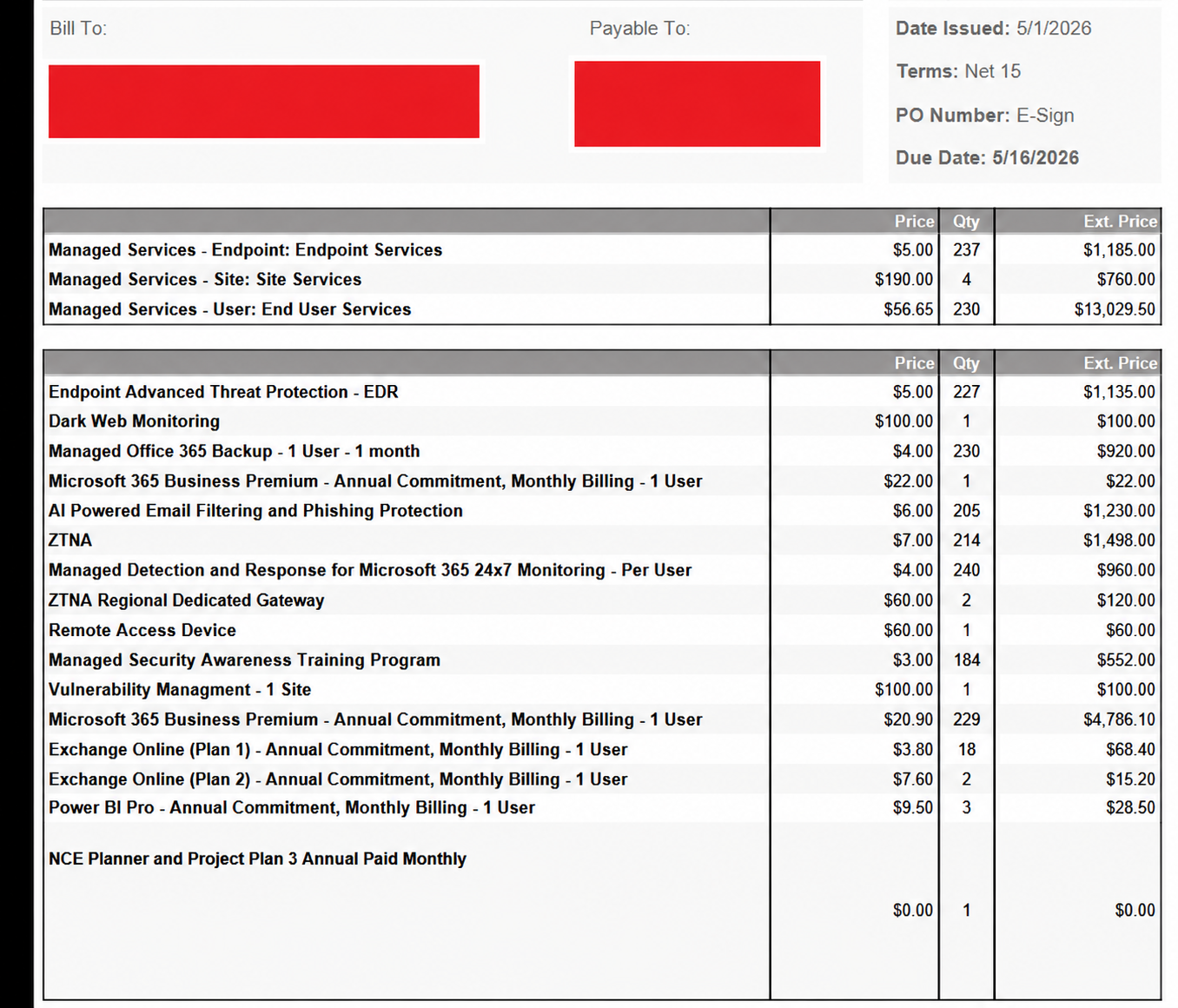
A Real MSP Invoice: When 157 Employees Become 240 Billable Users
An anonymized MSP invoice dated May 1, 2026, illustrates why businesses should examine their monthly IT bills.
The organization had approximately 157 active employees.
As you can see from the picture, the MSP is charging for 184 seats for security awareness training yet only 157 actual people work at this company. How could this be?
The MSP was dishonestly charging per account, even though the invoice says “per user”.
Yet the invoice included charges for 230 managed IT users, 240 users of a Microsoft 365 monitoring service, and 184 security awareness training seats.
It also included 230 Microsoft 365 backup subscriptions, 205 email filtering subscriptions, and 214 Zero Trust Network Access subscriptions.
The visible charges totaled approximately $26,569.70 for a single month.
To be clear, that total alone doesn't mean the MSP was charging too much. The bill included software licenses, device management, multiple locations, and security services.
The concern is whether the quantities being billed were accurate.
Examining Three Questionable Charges
The invoice shows three significant discrepancies between the number of active employees and the number of users being billed.
1. Managed IT Support ($56.65/user)
Users billed: 230
Actual employees: 157
Potential excess: $4,135.45/month
2. Microsoft 365 Monitoring ($4/user)
Users billed: 240
Actual employees: 157
Potential excess: $332.00/month
3. Security Awareness Training ($3/user)
Users billed: 184
Actual employees: 157
Potential excess: $81.00/month
Total Potential Billing Discrepancy
$4,548.45 per month
$54,581.40 annually
These calculations assume each service should be billed once per active employee, without additional covered users or contractual minimums. The amounts represent potential discrepancies requiring verification, not confirmed overcharges.
This example demonstrates why businesses must distinguish between employees, computers, Microsoft 365 accounts, and software licenses.
An account is not necessarily an employee, and businesses shouldn't automatically be billed as though it is.
An Email Account Isn't Always an Employee
This is where MSP billing can become unnecessarily expensive.
Consider a business with 157 employees. It might have significantly more than 157 Microsoft 365 accounts.
Why?
Because businesses often maintain additional accounts or mailboxes for departments, general inquiries, shared services, former employees, automated applications, or other operational purposes.
For example, a company might use accounting@company.com, support@company.com, and reception@company.com.
These addresses serve legitimate business functions, but they don't necessarily represent three additional employees requiring full managed IT support.
A business shouldn't automatically be charged for three more full-service IT users simply because those addresses exist.
Microsoft 365 even allows properly configured shared mailboxes to operate without separate mailbox licenses in many circumstances, subject to storage limits and feature requirements.
A qualified MSP should understand these distinctions and configure accounts appropriately.
Some accounts genuinely require separate software licenses or security coverage. Others do not.
The key is that account-based charges should correspond to a legitimate licensing or service requirement, not simply the total number of accounts in a directory.
Security Awareness Training: Are You Training People or Email Addresses?
Security awareness training is another example of why accurate billing matters.
These programs educate employees about phishing emails, suspicious links, password security, and common cyberattacks.
Their purpose is to train people.
In the example invoice, the organization was charged for 184 security awareness training seats despite having approximately 157 active employees.
That raises an obvious question:
Who are the additional 27 people being trained?
An employee with multiple email addresses doesn't automatically become multiple people requiring separate training.
A shared mailbox doesn't attend cybersecurity training. Neither does an automated service account.
There may be legitimate reasons for additional seats, such as contractors or employees who joined or departed during the billing period.
However, an MSP should be able to produce a list of enrolled users and explain exactly why each seat is being billed.
Businesses should be paying for meaningful security education, not simply inflated enrollment numbers.
Per-Device Billing vs. Per-User Billing
Not every number on an MSP invoice should match employee headcount.
This distinction is important.
A company with 157 employees might legitimately have 200 or more computers and other managed devices.
Some employees use both a desktop and laptop. Others may have shared workstations, dedicated servers, or specialized computers.
For these environments, device-based charges may exceed employee headcount for perfectly valid reasons.
Similarly, backup solutions and certain security platforms may charge per protected mailbox, account, or device rather than per person.
The problem isn't that all quantities are different.
The problem is when a business can't determine what those quantities represent or why they're paying for them.
If an invoice says "per user," the customer should know exactly how a user is defined.
If the provider is actually billing for individual Microsoft 365 identities rather than individual employees, that distinction should be clearly communicated.
Software Licenses Can Create Additional Hidden Costs
Software licensing deserves special attention because Microsoft 365 and other subscription platforms frequently involve recurring commitments.
Businesses sometimes continue paying for software assigned to employees who have left the company.
Unused subscriptions may also remain active because nobody is regularly reviewing the license inventory.
With Microsoft 365, removing a license from an account does not always immediately eliminate the subscription expense, particularly when the company has an annual commitment.
That makes regular license reviews essential.
A responsible MSP should help clients identify unnecessary licenses, prevent avoidable renewals, and understand their contractual obligations.
This is especially important when an organization is paying for hundreds of subscriptions.
Even a handful of unnecessary licenses can add up to thousands of dollars over time.
What Should Be Included in Your Monthly MSP Fee?
When evaluating an MSP, businesses should look beyond the advertised per-user price.
A managed IT agreement should clearly explain which services are included and which incur additional charges.
Common managed IT services include technical support, remote monitoring, software patching, endpoint management, network administration, Microsoft 365 support, cybersecurity administration, vendor coordination, and IT documentation.
Security awareness training, cloud backups, advanced threat protection, and software licensing may either be included or sold separately, depending on the provider.
Neither approach is automatically better.
What's important is transparency.
If an MSP charges $125 per user and includes basic cybersecurity and monitoring, that may be a better value than a provider charging $75 per user but adding $70 in separate monthly services.
Businesses should compare the total cost of receiving the same level of protection and support, not merely the base price.
Five Questions to Ask Your MSP About Billing
Before signing a managed IT agreement, or when reviewing an existing one, ask your provider:
How do you define a billable user? Is it an actual employee, an active Microsoft 365 account, or every account in the directory?
Can you provide an itemized list of billed users and devices? You should be able to reconcile each quantity with your actual environment.
Which security tools are included in the monthly fee? Understand whether endpoint protection, email security, backup, and security awareness training are included or additional.
How frequently are licenses and user counts reviewed? Changes in staffing should trigger an appropriate review of billing and software assignments.
Are there minimum commitments or charges that continue after an employee leaves? This is particularly important with annual software subscriptions and fixed-term agreements.
If your MSP can't clearly explain what you're paying for, that's a reason to request a more detailed review.
The Acolyte Tech Services Approach: Straightforward IT Pricing
At Acolyte Tech Services, we believe businesses should understand exactly what they're paying for.
Managed IT should simplify business operations, not introduce confusing invoices filled with unexplained charges.
Our philosophy is straightforward: provide dependable technical support, professional IT management, and the security tools businesses need, with clear pricing and well-defined services.
We focus on helping small and medium-sized businesses access enterprise-level IT capabilities without building an expensive internal department.
That means working with businesses to understand their actual number of users, devices, software subscriptions, and infrastructure requirements rather than treating every account as another employee.
It also means helping clients make informed decisions about their technology investments and identifying opportunities to eliminate unnecessary expenses.
Conclusion: Your MSP Should Be Saving You Money, Not Creating Unnecessary Expenses
Managed IT services can be an excellent investment.
For a predictable monthly cost, businesses can gain access to experienced technicians, cybersecurity tools, network management, and proactive maintenance that would otherwise require significant internal resources.
But the value of managed IT depends on responsible management and transparent billing.
A company with 157 employees shouldn't automatically be paying for 230 full-service IT users simply because its Microsoft 365 environment contains additional accounts.
And if an MSP is charging for 184 security awareness training seats, it should be able to explain who those seats belong to and why they're necessary.
Every charge should have a clear purpose, and every billed user, device, or license should be accounted for.
Is Your Business Overpaying for IT?
If you're unsure whether your current IT provider is billing you accurately, Acolyte Tech Services can help you evaluate your technology environment and understand your options.
Whether you're looking for a new managed IT provider or simply want a clearer picture of your existing IT expenses, we're here to help.
Visit acolyte-tech.com to learn more.
Acolyte Tech Services
Reliable IT. Responsive Support.
